For solo founders running more than one product

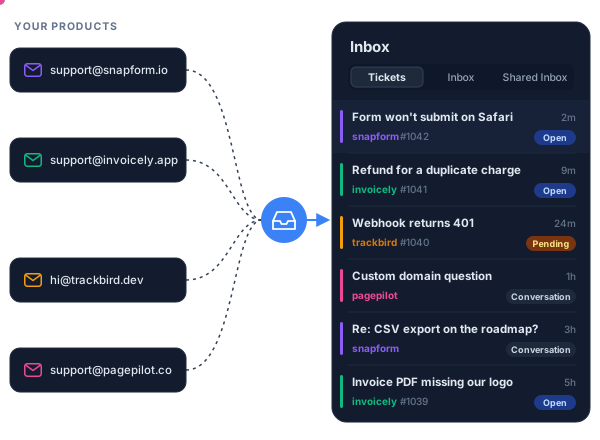
Ten products. One support inbox.

Every product's support email and tickets land in one place, on each product's own domain. Answer from the dashboard, from Claude Code, or from your AI chat, without leaving what you're building.

14-day trial. Card needed, cancel anytime.
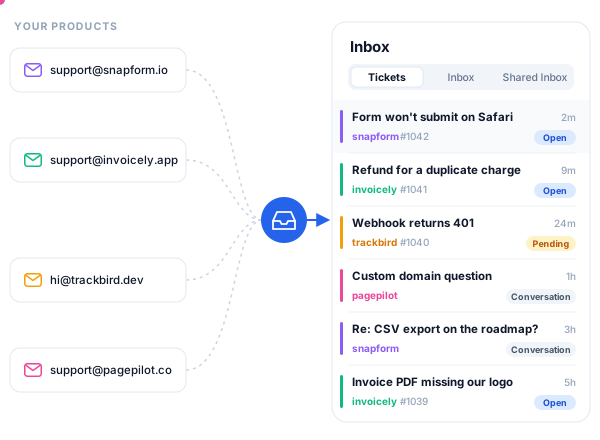
Support email from several products flowing into one PimiDesk inbox Support email from several products flowing into one PimiDesk inbox
PimiDesk in 30 seconds. Music: “Carefree” by Kevin MacLeod (incompetech.com), CC BY 4.0.
The problem

Support shouldn't need a second job

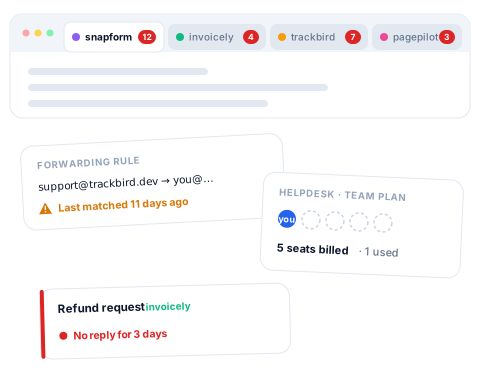
One Gmail tab per product. Forwarding rules you don't trust. A helpdesk priced per seat, built for teams of twenty. When you run several products on your own, support ends up spread across tools that each want a little maintenance, every week.

PimiDesk puts it back in one place, and lets you handle it the way you already work.

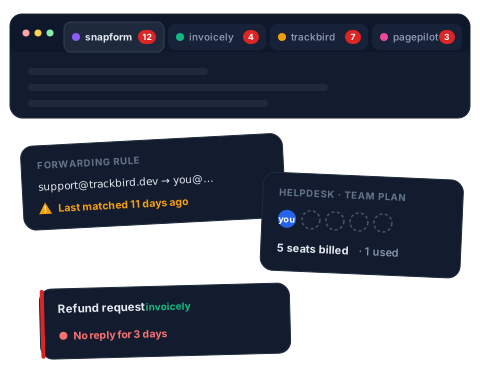
Support for several products spread across separate mail tabs, forwarding rules and a per-seat helpdesk Support for several products spread across separate mail tabs, forwarding rules and a per-seat helpdesk
One inbox, every product

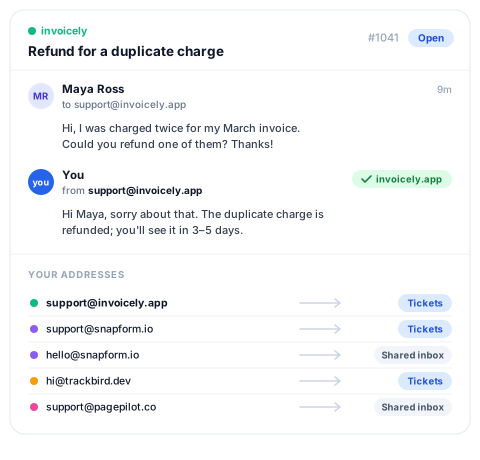
Every product, its own address, one inbox

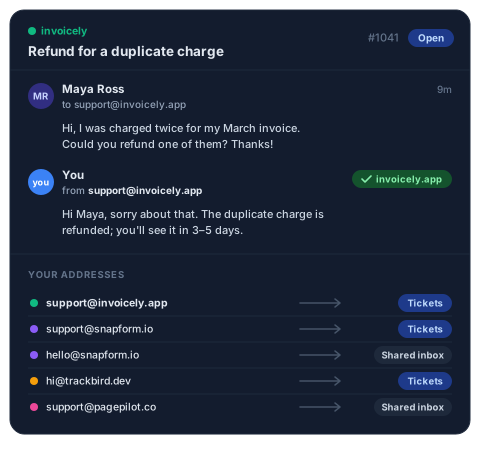
  • support@ each of your domains, received and sent from that domain, not a shared helpdesk address.
  • Email becomes a ticket, or stays a conversation: shared inbox for support, personal inbox for everything else.
  • Keep products apart in their own workspaces when you want a hard wall between them.
A support ticket answered from the product's own address, and each product's address set to create tickets or shared-inbox conversations A support ticket answered from the product's own address, and each product's address set to create tickets or shared-inbox conversations
Work it from where you build

Answer support without leaving your terminal

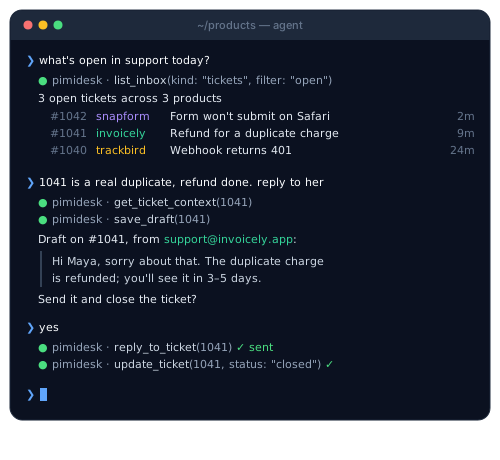
  • Claude Code: add the PimiDesk MCP server, sign in, and ask: "show me today's open tickets", "draft a reply to #42", "what did this customer ask last month?"
  • Your AI chat: the same connector works in claude.ai, ChatGPT and any MCP client. It has 40 tools, and you choose whether it may read, draft or send.
  • Bring your own AI. PimiDesk doesn't bundle a model or charge for AI. Your AI tool does the thinking; PimiDesk is the inbox, the tickets and the API underneath.
A terminal AI agent listing open PimiDesk tickets, drafting a reply from the product's own address, sending it and closing the ticket
Built on an API

Everything the dashboard does, the API does

  • REST API with 250+ operations: tickets, conversations, contacts and drafts
  • 17 webhook events, each delivery signed
  • Rules that tag, assign or answer new mail
  • Response and resolution targets per priority

Script anything; the AI tools use the same API you do.

The API runs on a server PimiDeploy provisioned, and PimiPulse watches that server.

cURL
# Create a ticket via API
PIMIDESK_API=https://desk-api.pimi.io/api/v1

curl -X POST "$PIMIDESK_API/workspaces/$WS_ID/tickets" \
  -H "Authorization: Bearer $PIMIDESK_TOKEN" \
  -H "Content-Type: application/json" \
  -d '{
    "subject": "Refund for a duplicate charge",
    "description": "Charged twice for my March invoice.",
    "contact": {
      "name": "Maya Ross",
      "email": "[email protected]"
    },
    "workspace_email": "[email protected]",
    "priority": "high"
  }'

Every plan has every feature

Plans differ only in the limits below. The API, webhooks, automations, SLA targets, custom domains and the MCP server are on all three.

Lite

$9 / mo
Billed monthly · cancel anytime
  • 1 workspace
  • 2 team members per workspace
  • 20 email addresses per workspace
  • 5 email domains per workspace
Start free trial

Business

$79 / mo
Billed monthly · cancel anytime
  • 3 workspaces
  • 20 team members per workspace
  • 100 email addresses per workspace
  • 25 email domains per workspace
Start free trial

There is no free plan. A new subscription starts with a 14-day trial. You enter a card at Paddle checkout and are charged when the trial ends. During the trial a workspace can receive mail and reply to it, but cannot start a new thread.

The limits and billing questions are on the pricing page. What we protect, and what is still missing, is on the security page. How your AI tool connects is on the AI connection page.

Questions before you sign up

Who is PimiDesk for?
Solo founders and very small teams running more than one product, who want every product's support email in one inbox on its own domain.
Can I manage support from Claude Code or ChatGPT?
Yes. PimiDesk has an MCP server with 40 tools. Claude Code, claude.ai, ChatGPT or any MCP client can read tickets, draft replies and act on them, within the access level you give it. The MCP server guide has the steps.
Does PimiDesk include AI?
No, on purpose. You bring the AI tool you already use; PimiDesk provides the inbox, tickets and API it works on.
Can I sign up today?
Yes. Start free trial, confirm your email, then choose a plan.
Can I use my own email domain?
Yes, on every plan. Add the domain, publish the DNS records the dashboard shows, and create addresses on it. If you would rather not change your MX records, forward your existing mailbox to a PimiDesk address instead.

All PimiDesk questions →

Run support like you run your code

One inbox for every product, driven from wherever you work.

Start free trial

14-day trial. Card needed, cancel anytime.